Android MVP · field testing in progress

Rest easy.
We’ll wake you up.

Choose your destination and relax. Once it is saved, WakeAt checks the distance on your phone and alerts you before arrival, even when the network disappears.

  • No account
  • No ads
  • On-device core
Active trip 08:14
12.4 km to your destination
Accurate GPSStrong signal
Fallback readyDeadline 08:35
Easy to start

Three steps, then you can close your eyes.

No timetables to calculate or routes to share. WakeAt only needs your destination.

  1. 01

    Choose where

    Search for a stop, touch the map or reuse one of your saved trips.

  2. 02

    Choose when

    Adjust the radius and add a GPS timer or deadline for extra peace of mind.

  3. 03

    Relax

    Monitoring stays visible and the alarm uses sound, vibration and an urgent notification.

New in the MVP

Faster to prepare.
Clearer on the move.

The latest features already work in the app and follow the same principle: greater confidence, with no account or paid services.

Address search

More results, without losing context.

Photon and Geocoder suggestions are merged into a scrollable listbox. Search does not send your GPS position and clears when you leave.

Quick destinations

Saving Home is now a guided flow.

Configure each slot from the current destination or a new search, review the summary and confirm. Named routes remain available for complete configurations.

Trip widget

Your status, without reopening the app.

Distance, GPS quality, fallbacks and Stop are visible from your Home screen. The widget only reads local state and never starts background activity.

Local reports

Useful data, not your route.

Aggregate GPS, duration and battery metrics for up to 20 trips. Add a note, delete reports or share a CSV only when you decide to.

A local safety net

It does not rely on one thing going right.

Location, timer and deadline work together. When something degrades, WakeAt tells you clearly.

PROXIMITY

A radius around where you want to wake up.

Distance is calculated on your device and location sampling adapts as you approach.

GPS LOST
06:42

Emergency countdown

If the signal is missing for too long, the local timer can trigger the alarm early.

DEADLINE
08:25Wake me anyway

Independent from GPS

A second safeguard chosen by you, useful in tunnels and on routes with unstable coverage.

ALWAYS CLEAR

Your trip status, without reopening the app.

The persistent notification and widget show distance, GPS quality, fallbacks and Stop.

Transparency before promises: validation on physical devices from different manufacturers is in progress. WakeAt shows degraded states and does not promise absolute accuracy where GPS cannot provide it.

Designed for Android

Everything you need.
Nothing you don’t.

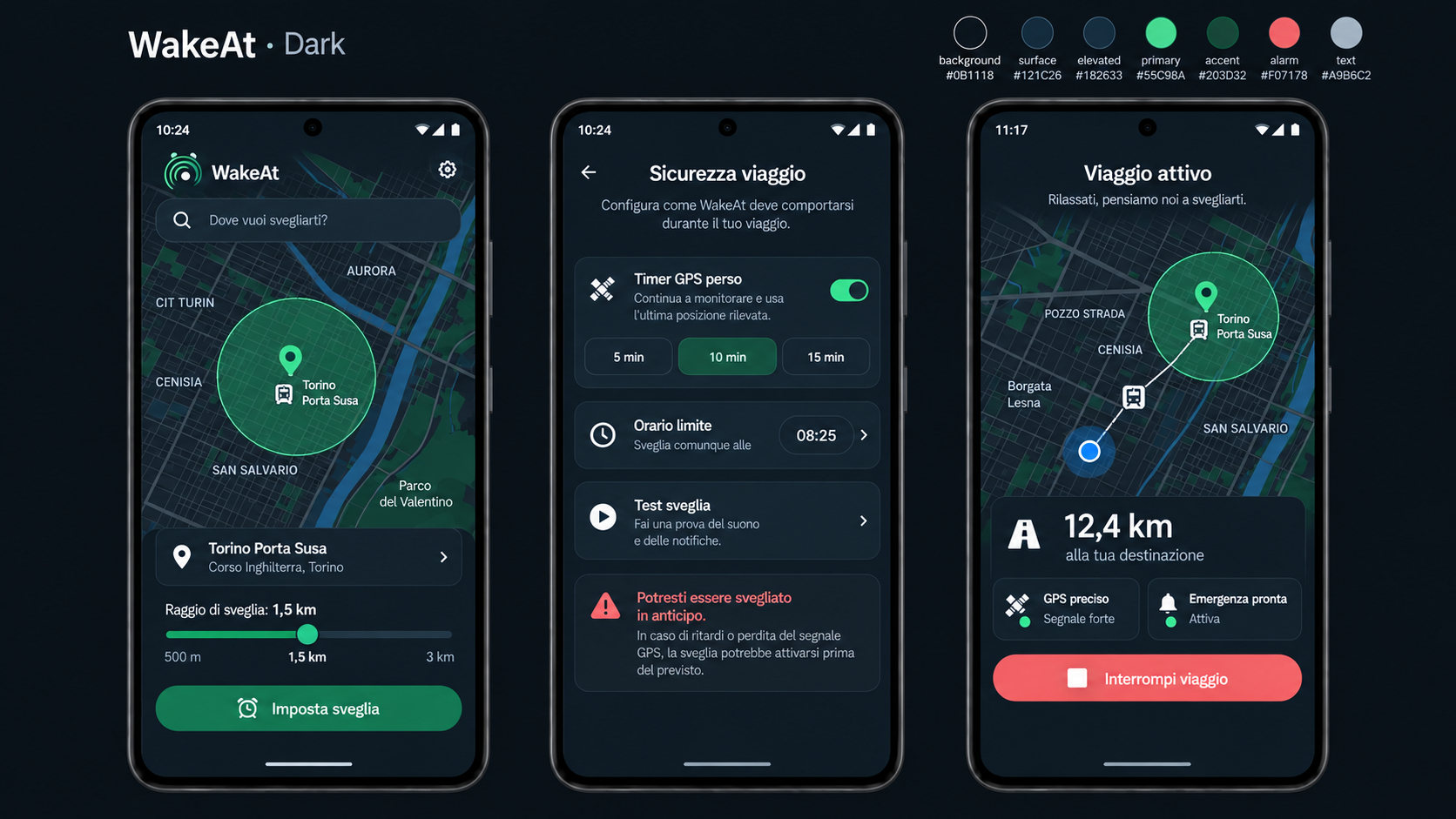
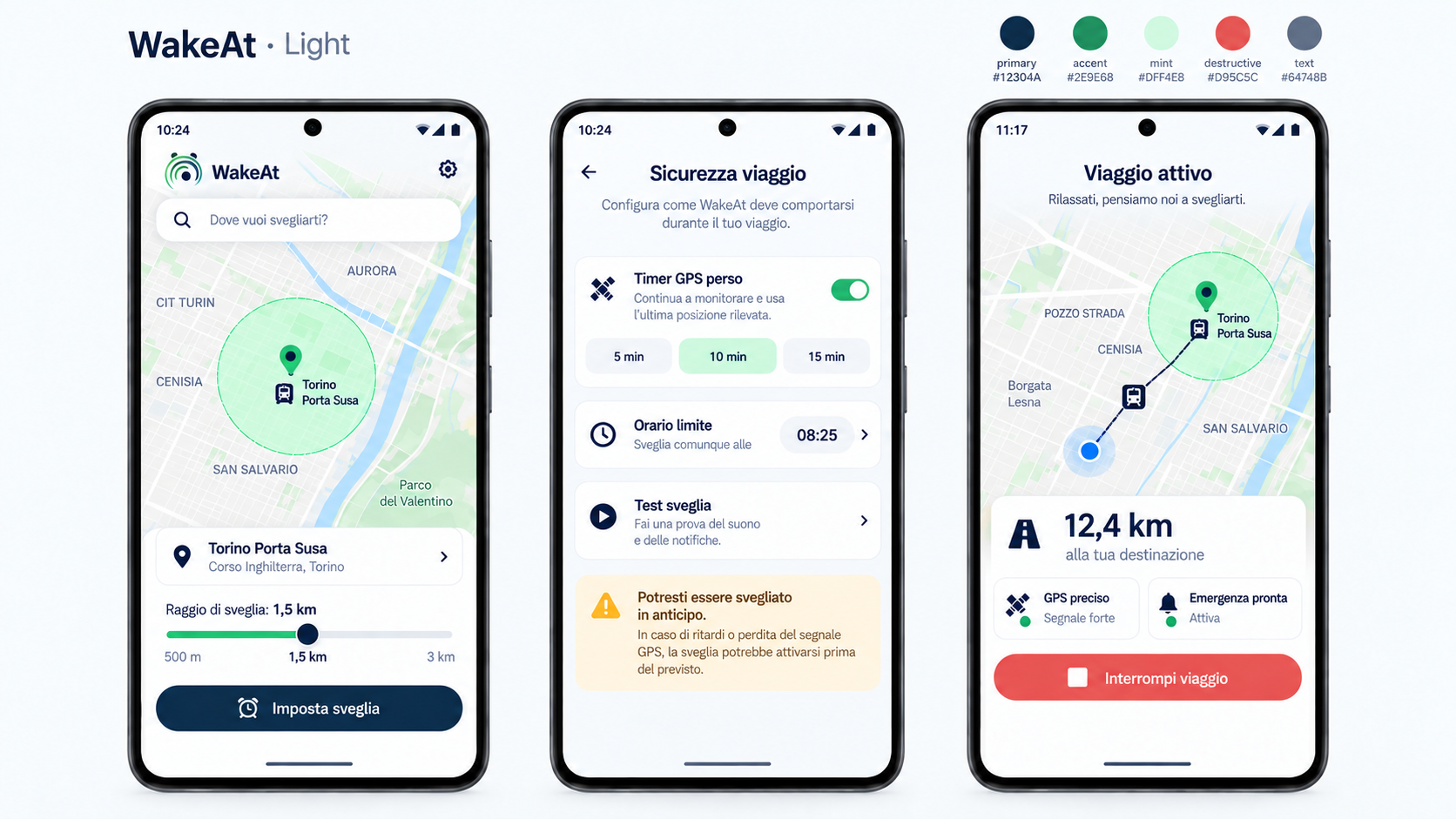
An interface you can read at a glance, in light or dark mode. Important states never rely on colour alone.

  • Profiles for buses, regional and high-speed trains
  • Home, Work, University and custom trips
  • Test the alarm before departure
  • Local reports with notes and CSV export
Three WakeAt screens in light mode: destination, safety and active trip Three WakeAt screens in dark mode: destination, safety and active trip
Privacy by architecture

Your journey stays yours.

WakeAt has no accounts, ads, analytics or proprietary backend. Destinations, preferences and trip status stay on your phone; maps and search contact the providers disclosed in the policy.

On-device calculationsDistance and alarm triggers are processed locally.
No route historyReports contain no coordinates; destination names and notes may be personal.
Deletion under your controlRecent destinations, presets and reports can be deleted in the app.
Read the full privacy policy
Version 0.1.0 · Android 8+

Help us test it in the real world.

We are validating reliability and battery usage on real journeys, with the screen off and on devices from different manufacturers.

I want to take part
Frequently asked questions

Before you leave.

The essentials about operation, connectivity and privacy.

Does WakeAt work without Internet access?

Yes, once your destination is saved. GPS, distance, timers and the alarm work locally; the map and search may degrade without a network connection.

Do I need to create an account?

No. WakeAt requires no registration and has no proprietary backend. App data stays on your device.

What happens if GPS disappears?

You can set an emergency countdown, including a dynamic one based on the trip, and a deadline. WakeAt clearly shows when coverage is weak or missing.

What is sent when I search for an address?

The text you type and ordinary network data reach Photon and, when needed, the device Geocoder. WakeAt does not send your GPS position to Photon and stores no query history.

Why do I sometimes skip the Reliability page?

If every detectable check is ready, WakeAt starts the trip directly. The page appears when there is a warning or issue to handle; its result is still a point-in-time check, not an absolute guarantee.

Is it available on the Play Store?

Not yet. The MVP is undergoing field validation before the release candidate. You can apply to join the tests.

Your stop.
Our only concern.

Rest during the journey, with a transparent, local safety net.

Join the beta